
Blood Pressure Diary by MedM
MedM IncMedical
4.4157.00 Reviews
- Version
- 3.10.5
- Installs
- 100.00K
- Age Rating
- Everyone
Screenshots
Our Review of Blood Pressure Diary by MedM
 Analysis by Appyee
Choosing a blood pressure diary is less about finding the most elaborate health app and more about picking a routine you can actually keep. I’d look for a place to record readings consistently, review them without fuss, and bring a useful history to a healthcare appointment. Blood Pressure Diary by MedM is aimed squarely at that job: it is a medical app from MedM Inc, rather than a general wellness tracker, and its focus makes it a sensible option if blood pressure is the main thing you want to follow.
What to consider before choosing a tracker
Before installing any logging app, it helps to decide how you take readings. If you use a home blood pressure monitor and want a separate record on your phone, a diary can make those results easier to review than loose notes or a paper notebook. If your main goal is to understand several kinds of health information together, a broader health platform may suit you better—but only if its extra scope does not make recording a simple reading feel like work.
I also think it is worth separating record-keeping from medical advice. A graph can help you notice a change in your readings, but it cannot tell you what that change means for your individual health. I would use this app to keep a clear history and discuss it with a clinician, not to diagnose myself or change treatment based on a screen.
A focused place for readings and context
The useful part of a diary is not just the numbers; it is having enough context to make them easier to discuss later. A note beside a reading can help you remember what was going on at the time, especially if you are trying to describe a pattern rather than one isolated result. I would keep notes brief and practical—such as a change in routine or how I felt—rather than trying to turn each entry into a full health journal.
That approach also makes the app more useful when someone else needs to look at the record. A concise log is easier to scan during an appointment than a long collection of unstructured comments. If you share readings with a healthcare professional, I would still bring up the circumstances around them and follow any measurement instructions you have been given; an exported record is a conversation aid, not a substitute for that context.
Who may prefer another kind of app
For someone who only takes an occasional reading, a paper note or the basic notes app already on their phone may be enough. There is little benefit in adding another app if you will not enter readings regularly or look back at them. On the other hand, if you are tracking blood pressure over time, a dedicated diary can give that information a clearer home than a general-purpose memo.
People who want one place for many health measurements may lean toward a broader health or fitness platform instead. That choice can make sense when the person is already using it consistently, but it can also introduce more screens and organization than a blood-pressure-only task needs. I would choose the narrower tool if keeping this particular habit simple is the priority, and the broader one if combining different records matters more.
There is also a practical limit to any phone-based log: it depends on entering readings accurately and at a useful time. If you regularly forget to record results, a diary cannot reconstruct them later. A reminder can support a routine, but it will not replace the routine itself, and I would avoid letting notifications become background noise that I dismiss automatically.
Turning a reading into a repeatable routine
A realistic use case is someone who checks their blood pressure at home and has an appointment coming up. Rather than trying to remember a week of readings in the waiting room, they can enter each result soon after taking it, add a short note when something about that reading seems relevant, and review the history before the visit. The aim is not to chase a particular graph shape; it is to arrive with a record that is easier to discuss than memory alone.
One small habit can make a log more dependable: use a consistent time and follow the measurement guidance from your clinician or monitor instructions. If readings are taken under very different conditions, comparisons may be harder to interpret. I would treat a missed entry as a missed entry rather than guessing later, because a complete-looking record is not necessarily a more honest one.
For a shared phone or a device used by more than one person, I would also pause before entering health information and make sure the record is being kept for the right person. That is a simple step, but it prevents a tidy diary from becoming confusing or misleading when someone reviews it later.
There is a modest learning curve in deciding what belongs in the notes and how often to review the charts. I would keep the process deliberately light: enter the reading, add only useful context, and look for broad patterns when there is a reason to do so. Constantly checking a graph can create worry without adding meaningful insight, particularly when a clinician is better placed to interpret changes.
For people who use several health apps, it is tempting to expect every record to live in one perfectly connected system. The app’s description points to integrations with health and fitness apps, but I would check that the particular services and workflow I rely on are supported before making it the center of a wider tracking setup. If dependable cross-app organization is essential, an established platform you already use may be the more practical choice.
Easy Setup and User-Friendly Interface
Setting up the Blood Pressure Diary by MedM is a breeze. After downloading it from the app store, I was greeted with a clean and straightforward interface. No overwhelming options or confusing instructions here. Just a simple, intuitive layout that made me feel like even my tech-challenged aunt could navigate it without a hitch.
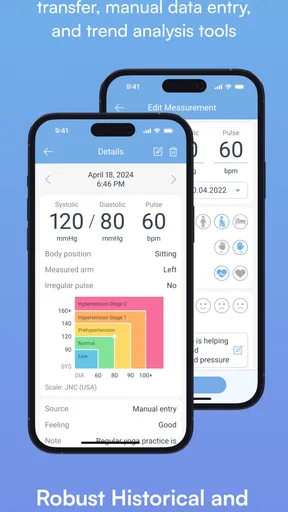
Once you're in, adding a new entry is as simple as tapping a button. The app prompts you to enter your systolic and diastolic values, pulse, and any notes you want to remember about that particular reading. I really appreciated the notes feature, as it allowed me to jot down what I had eaten or how stressed I was feeling at the time.
Comprehensive Tracking and Insights
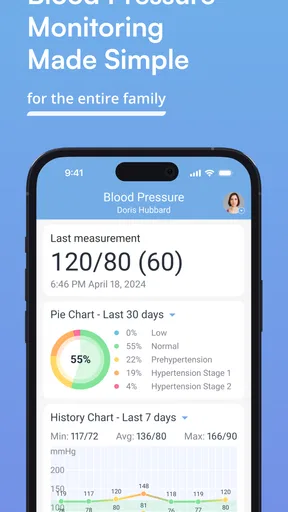
One of the standout features of this app is its ability to track and display your data in a visually appealing way. The app offers graphs and charts that make it easy to spot trends over time. This is a game-changer for anyone who's serious about managing their health. Seeing my blood pressure fluctuating on a graph made it much easier to understand the impact of different lifestyle choices.
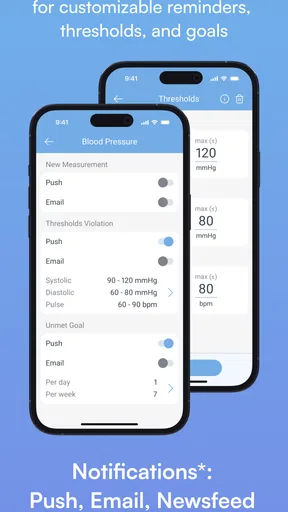
There’s also a handy calendar view, where you can see all your readings at a glance. This visual representation is not only motivating but also helps identify patterns that might otherwise go unnoticed. Plus, the option to set reminders ensures you won't forget to take your readings, which is perfect for those of us who are a bit absent-minded.
Data Export and Sharing Capabilities
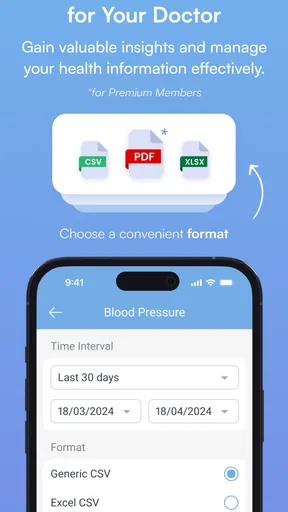
Another feature that I found incredibly useful is the ability to export data. You can easily share your blood pressure logs with your doctor via email or other messaging apps. This makes it super convenient for keeping your healthcare provider in the loop without needing to carry around a physical diary. I found this feature particularly handy during my last doctor's visit, where I could just whip out my phone and show the doctor all my recent readings.
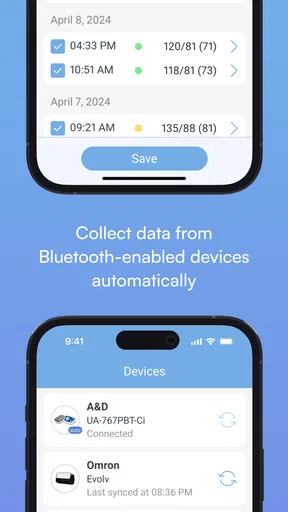
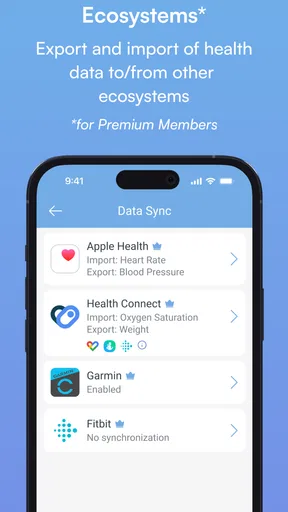
The app also supports integration with various health and fitness apps, which means you can sync your data seamlessly. This integration adds an extra layer of functionality, allowing you to have a holistic view of your health metrics all in one place.
Personal Experience and Final Thoughts
Using the Blood Pressure Diary by MedM has been a transformative experience for me. Before, I had a vague idea of my blood pressure trends, but now I have detailed insights at my fingertips. This app doesn't just log numbers; it tells a story about your health over time.
Whether you're someone who needs to monitor their blood pressure regularly or just want a reliable tool to track occasional readings, this app is worth checking out. It's simple, effective, and fits effortlessly into your daily routine. The peace of mind knowing you have accurate and comprehensive data right in your pocket is invaluable.
So, if you're on the hunt for a reliable blood pressure tracking app, I’d say give this one a go. It's like having a personal health assistant that never takes a day off!
Cost, compatibility, and keeping your records manageable
The app is free to download, with in-app purchases listed from about six dollars to one hundred dollars per item. That range is wide enough that I would look at the purchase details in the app before paying for anything, especially if I only need a straightforward log. The free starting point makes it easy to judge whether the entry process fits your routine before deciding whether an optional purchase is worthwhile.
It is rated for everyone, and its current version is 3.9.1513, with Android 5.0 as the minimum operating-system requirement. Those details matter if you are installing it on an older phone or helping a family member set it up. The app has been available since September 24, 2015, and its user base includes more than 100,000 installs; its average rating is 4.4 from around 2,400 ratings, with 154 written reviews. I see that as a useful sign of an established app, not a guarantee that every feature or workflow will suit you.
To keep a long-running record useful, I would agree on a simple naming and note-taking habit from the start. For example, write down only context you may want to explain later, rather than adding speculative reasons for a change. If you export readings, check that the file or message is going to the intended recipient, and keep a copy in whichever place you normally use for important health information. That small bit of organization can matter more than filling the diary with extra commentary.
My recommendation depends on the job you need done
I’d recommend this to someone who already measures their blood pressure and wants a dedicated, visual record that is easier to bring into a conversation with a clinician. The calendar, charts, notes, reminders, and export option make it more useful than a bare list of values for people who will actually use those tools. MedM’s app is at its best when it supports a steady habit without turning that habit into a complicated project.
I would skip it if you rarely take readings, prefer keeping all health information in a platform you already trust, or need an app to interpret results and direct care. It is a diary, not a blood pressure monitor, and the readings still need to come from a separate measuring device. If you are comfortable entering them and want an organized history, it is a reasonable choice; if you want automatic measurement or medical guidance, look for a different kind of solution and discuss health decisions with a qualified professional.
So, if you're on the hunt for a reliable blood pressure tracking app, I’d say give this one a go. It's like having a personal health assistant that never takes a day off!
Verdict
Strengths of Blood Pressure Diary by MedM
- User-friendly interface for easy navigation.
- Tracks data over time for health insights.
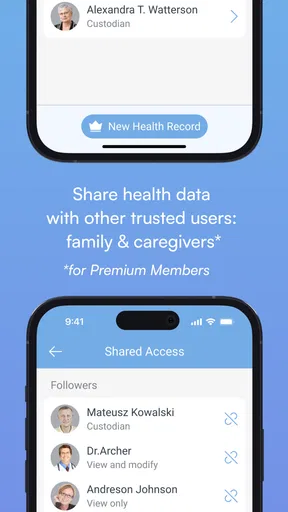
- Supports multiple users on one device.
- No ads to interrupt user experience.
- Synchronizes with various health devices.
Limitations of Blood Pressure Diary by MedM
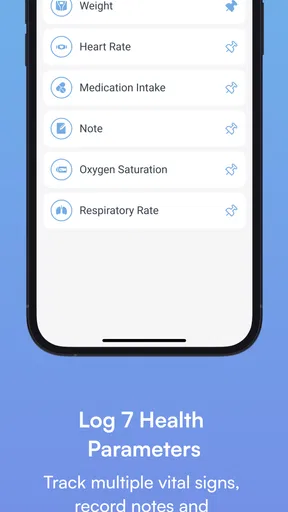
- Limited customization of health metrics.
- Requires manual data entry for some inputs.
- No integration with fitness apps.
- Graphical data representation could improve.
- Lacks reminders for regular entries.
Other Releases by MedM Inc
View All
Health Diary by MedM
Medical4.7
Similar Picks in This Category
View All
WebMD: Symptom Checker
WebMD, LLC4.1

Microphone Amplifier
DOSA Apps4.2

Anatomy Learning - 3D Anatomy
3D Medical OU4.5

Period Tracker and Calendar
SimpleInnovation4.9

GoodRx: Prescription Coupons
GoodRx4.8

CVS Health
CVS Pharmacy4.5
Frequently Asked Questions
What features does Blood Pressure Diary by MedM offer?
Blood Pressure Diary by MedM allows users to effortlessly record and track their blood pressure readings. The app provides detailed graphs and statistics to help monitor trends over time. It also offers reminders for taking measurements and can sync data with other health apps, making it a comprehensive tool for managing cardiovascular health.
Is Blood Pressure Diary by MedM user-friendly for beginners?
Yes, Blood Pressure Diary by MedM is designed with an intuitive interface that's easy to navigate, even for beginners. The setup process is straightforward, and the app provides helpful prompts and tips to guide users through tracking their blood pressure effectively, ensuring a smooth experience for all users.
Can I export my data from Blood Pressure Diary by MedM?
Absolutely. Blood Pressure Diary by MedM offers a robust data export feature. Users can export their blood pressure readings and related information in various formats, such as CSV or PDF, allowing them to share their data easily with healthcare providers or store it for personal records.
Does Blood Pressure Diary by MedM integrate with other health apps?
Yes, the app integrates seamlessly with other health platforms. It supports synchronization with popular health apps like Google Fit and Apple Health, ensuring that users can have all their health data in one place. This integration enhances the app's utility, providing a holistic view of one's health.
Are there any in-app purchases or subscriptions in Blood Pressure Diary by MedM?
While Blood Pressure Diary by MedM offers a free version with essential features, there are optional in-app purchases available. These purchases may include additional features or premium services, such as advanced analytics. However, the core functionalities remain accessible without any cost.
